Cut out your photos in free proportions or use ready-made presets for Instagram, YouTube, Stories and Facebook. rotate, zoom and discharge; All in the browser, no files sent to any server.
Upload your photo, choose the proportions and download the perfect cutout. Everything happens in your browser.
Drag the photo to the drop zone or click "Browse File". Supported formats: JPG, PNG, GIF, WEBP. Maximum size 12 MB.
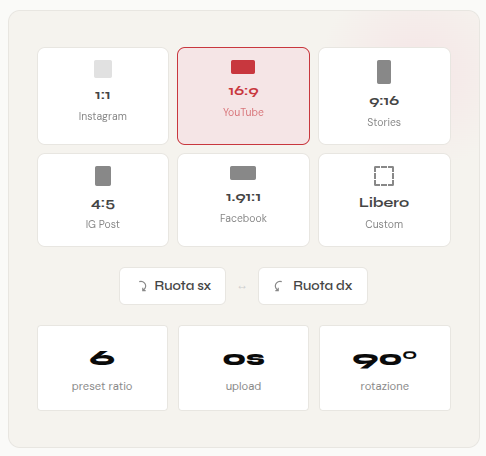
Select a social preset (1: 1, 16: 9, 9:16, 4: 5, 1.91: 1) or choose "Free" for a personalized clipping without constraints of proportion.
Move the clipping area, use the slider to zoom and the rotation buttons to orient the image 90 ° to the left or right.
Click "Download Crop" to save the image to your device in its original format. No watermarks, no limits.
Six predefined proportions for the most used formats online, plus free crop for customized needs.
The classic square format of Instagram. Perfect for posts in the feed, it also works well on other platforms.
The standard horizontal format for videos and thumbnail YouTube, presentations and web banners.
The vertical format for Instagram Stories, TikTok, YouTube Shorts and Facebook Stories.
The preferred vertical format of the Instagram algorithm for posts in the feed. takes up more screen space.
The horizontal format for Facebook sponsored posts and previews of links shared on social media.
No constraint of proportion: cut out exactly the area you want, with any rectangular shape.
Image size matters much more than you think. Each social platform has its own optimal proportions: an image loaded with the wrong size is automatically cut out in an often unhappy way, cutting important faces or elements. Using an online image clipper before uploading solves the root problem.
Instagram supports three main formats: the square 1:1 For the classic feed, the vertical 4: 5 For post portraits that take up more space in the home, and the 9:16 for stories and reels. With the default presets of our tool you can prepare the perfect images for each format in seconds.
The format 16: 9 It is the standard for YouTube thumbnails, PowerPoint presentations and horizontal banners. Cropping images in this format ensures that they are displayed correctly without black bands or distortions on widescreen screens.
Photos are not always perfectly oriented. The buttons of 90 ° rotation Left and right allow you to correct the orientation before cropping. The zoom slider allows you to accurately frame the desired area, even on high-resolution images.
Unlike many online services, cropping takes place entirely in your browser thanks to the HTML5 Canvas API. Your images never leave your device: no uploads, no data transmitted, no privacy risk. You can crop private photos, business documents or confidential images in total safety.
To provide the best experiences, we and our partners use technologies like cookies to store and/or access device information. Consenting to these technologies will allow us and our partners to process personal data such as browsing behavior or unique IDs on this site and show (non-) personalized ads. Not consenting or withdrawing consent, may adversely affect certain features and functions.
Click below to consent to the above or make granular choices. Your choices will be applied to this site only. You can change your settings at any time, including withdrawing your consent, by using the toggles on the Cookie Policy, or by clicking on the manage consent button at the bottom of the screen.