
Set width and height in exact pixels, choose the output format and quality. The proportions are updated automatically to avoid distortions. All in the browser, no files sent to any server.
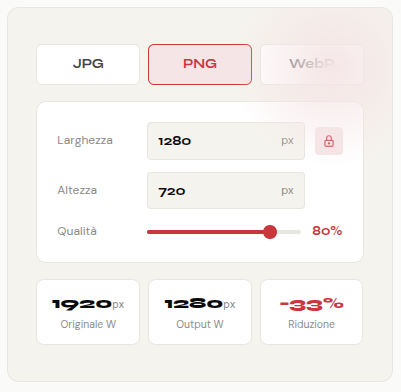
Upload the photo, set the size and download. Quality is always in your hands.
Drag the photo to the drop zone or click "Browse File". Supports JPG, PNG, GIF and WebP up to 10MB. The original size is displayed automatically.
Enter width and height in pixels. With the proportion block active, changing one value the other updates automatically. Choose format (JPG, PNG, WebP) and quality with the slider.
Click "Download Image" to save the resized file on your device. The Info panel shows original size, output and reduction percentage.
Four features designed to give you precision and flexibility in scaling.
Set width and height in pixels with values from 1 to 5000. Perfect when you need the exact size required by CMS, e-commerce or platform technical specifications.
With the "Keep original proportions" checkbox active, changing the width the height updates automatically (and vice versa). Avoid distortions without having to make manual calculations.
Choose from JPG for photographs, PNG for images with transparency and sharp texts, WebP for maximum compression on the web. You can change format on each download without reloading the file.
The quality slider (for JPG and WebP) allows you to balance file weight and image sharpness. The Info panel shows the percentage reduction in real time compared to the original.
Too large images slow down websites, increase loading times and penalize placement on Google. Resizing photos before uploading is one of the simplest and most effective operations to optimize the performance of a site. With censorpic's online image scaler you can do it in seconds, without software, directly in your browser.
A high-resolution photographic image can weigh several MB. For a website, ideal size rarely exceeds 1200–1600px width. Resize and optimize quality With the slider it can reduce the weight of the file by 80% or more, drastically improving the core web vitals and the speed of loading pages.
Each platform has different recommended dimensions: Facebook prefers 1200 × 630px images, 1200 × 627px LinkedIn, 1600 × 900px Twitter. Setting the exact dimensions before loading ensures that images are not compressed or automatically cropped from the platform, while maintaining the original quality.
JPG It is the best choice for complex photographs and images: excellent compression with slight loss of quality, light files. PNG It is ideal for logos, graphics, screenshots and text images: lossless compression, support transparency. WebP It offers the best of both: 30% lighter files than JPG for the same quality, and is supported by all modern browsers.
The “Keep original proportions” checkbox is active by default for a specific reason: change only width or height without updating the other value crushes or lengthens the image in a visually ugly way. With the block active, the calculation takes place automatically — just enter one dimension.
To provide the best experiences, we and our partners use technologies like cookies to store and/or access device information. Consenting to these technologies will allow us and our partners to process personal data such as browsing behavior or unique IDs on this site and show (non-) personalized ads. Not consenting or withdrawing consent, may adversely affect certain features and functions.
Click below to consent to the above or make granular choices. Your choices will be applied to this site only. You can change your settings at any time, including withdrawing your consent, by using the toggles on the Cookie Policy, or by clicking on the manage consent button at the bottom of the screen.